
Update Your Billing Info in our Customer Hub
A quick, step-by-step-guide
Need to update your membership subscription for The SpeakEasy Cooperative®? Have multiple subscriptions or installments? No problem! This guide will walk you through updating your credit card information for all your subscriptions in our Customer Hub.
What You’ll Need
- Your email address associated with your SECO purchases
- Your new credit card information
- A few minutes of your time (it’s quick, we promise!)
Step 1. Access the Customer Hub
- Visit our direct link: https://faithculturekiss.thrivecart.com/updateinfo/
- Enter your email address
- Click “Send me my link”
You’ll receive an email with a secure link to access your account. This helps keep your information safe!

Step 2. Check Your Email
- Open the email with the subject “Update info / view purchase history” (from accounts@thrivecart.email)
- Click on “Click here to update your info or view your purchase history

Step 3. Update Your Information
- Once in the Customer Hub, click on “Subscriptions” to see all your active subscriptions
- For each subscription or payment plan you want to update, click “Update card info”
- Click “Edit” to access the credit card form
- Enter your new credit card information
- Click “Save changes”
- Confirm by clicking “Yes, change my card”
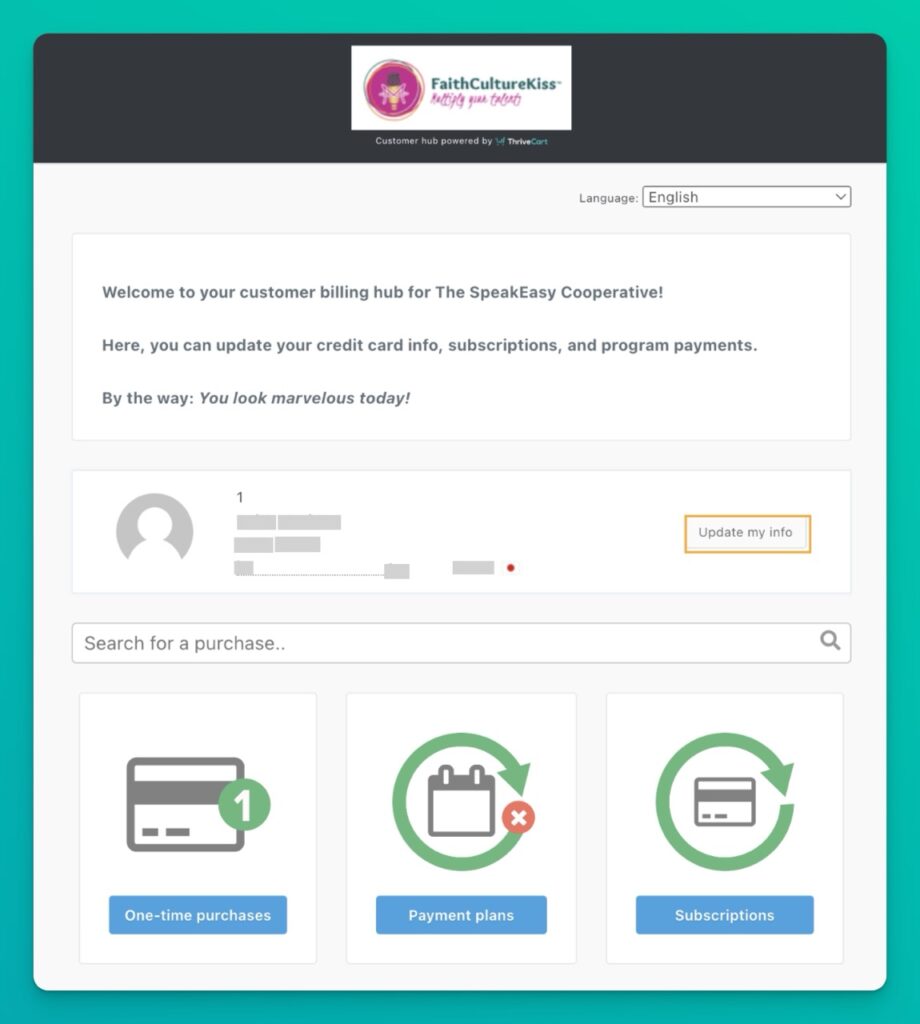


Important Note: If you have multiple subscriptions or installment plans with us (for example, your SECO membership plus another program like H2RA or VIPRoom), you’ll need to update each one separately.
Step 4. Verify Your Updates
- After updating, you can confirm all changes by checking the “Current” tab to see all your active subscriptions with their updated payment information
Need Additional Help?
We’re here for you! If you’re experiencing any issues updating your credit card information, please reach out to our support team at hey@faithculturekiss.com.
Frequently Asked Questions
Why do I need to update each subscription separately?
Each subscription in our system is processed individually to ensure proper tracking and management of your memberships. This helps us provide you with the best possible service for each program you’re enrolled in. This also gives you the opportunity to choose different payment methods for each subscription.
I purchased using different email addresses. How do I update all my subscriptions?
If you used different email addresses for your purchases, you’ll need to follow the same process for each email address. Start at our Customer Hub link and enter each email address one at a time. We recommend using the same email address for each subscription to make managing your subscriptions easiest.
Will updating my card information change my billing date?
No, updating your card information will not change your billing date. Your subscriptions will continue on their current schedule.
Is the Customer Hub secure?
Yes! We use ThriveCart’s secure payment system which meets the highest standards for online payment processing and data protection.
What if I have questions about managing my subscription?
Get the links you need in the Member Dashboard > Manage My Subscription, Billing, Email Address. You can also reach out to us at hey@faithculturekiss.com if you have further questions.